INVENTORY MANAGEMENT

Inventory Management: Know your stock, avoid stock-outs, free up cash

Turn your warehouse from a cost burden into a resource you manage well.

Product roadmap On the product roadmap — not yet on sale

Inventory Management is a module of KONEX POS and KONEX ERP, not a separate product, so it follows their status.

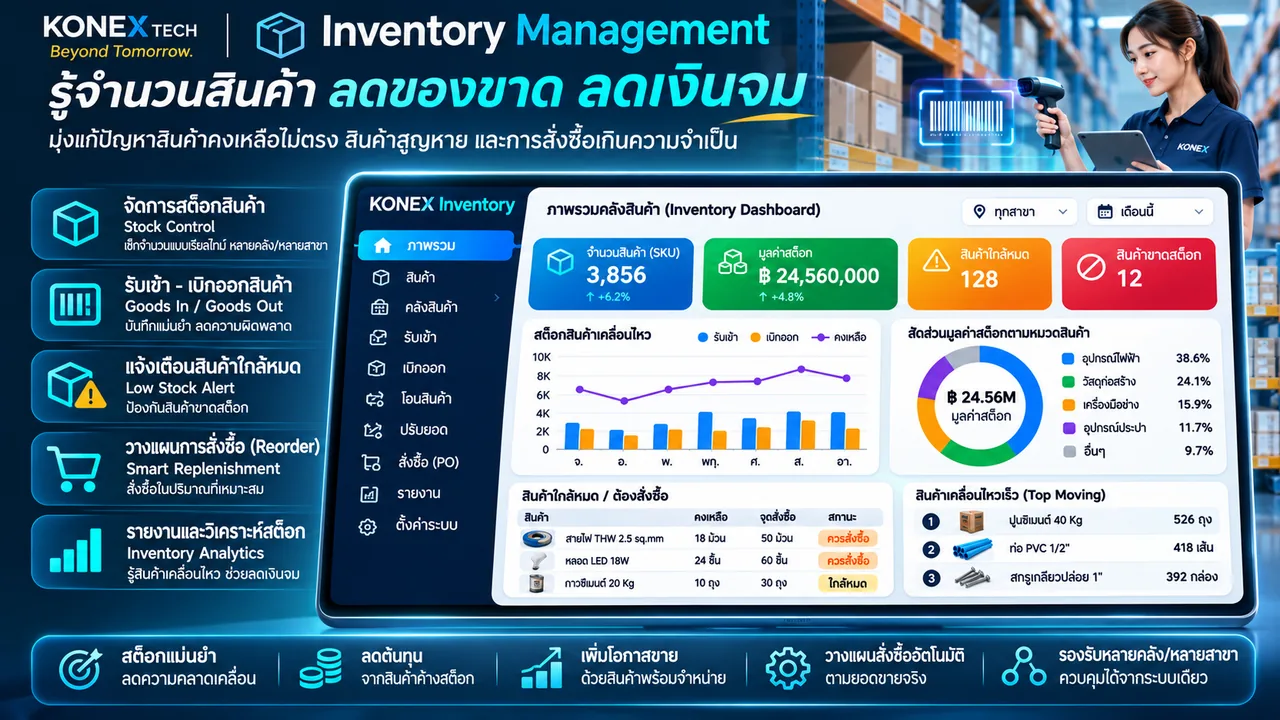
Inventory Management concept screens

Inventory module concept screen: stock, goods in/out and low-stock items
Concept screen. Figures and names shown are sample data.

What is Inventory Management?

Inventory management is a module within KONEX POS (basic stock) and KONEX ERP (advanced, multi-warehouse, multi-branch). It is not a separate product.

Problems owners run into

  • System stock does not match the shelf
  • Goods go missing
  • You over-order
  • Best-sellers run out
  • Too much slow stock
  • You do not know how much cash is tied up in stock
  • Several warehouses and branches are hard to control
BUSINESS BENEFITS

What it is designed to help you achieve

  • Stock that matches reality more closely
  • Fewer stock-outs on best-sellers
  • Less over-ordering
  • Visibility of cash tied up in stock
  • A traceable history of every movement

These are design goals, not proven or guaranteed results.

CORE FEATURES

Planned core functions

Capabilities are planned; availability and release dates are not confirmed.

Goods in, goods out and movements

What it does: Record every movement with barcodes and multiple units.

How it helps: Know when goods moved and who moved them.

  • Stock control
  • Stock movement
  • Goods in / goods out
  • Barcode management
  • Multi-unit management

Warehouses and counting

What it does: Transfers, counts, adjustments and reservations.

How it helps: Easier counts, with a reason and an approver for every adjustment.

  • Multi-warehouse
  • Stock transfer
  • Stock counting
  • Stock adjustment
  • Stock reservation
  • Stock audit trail

Analysis and alerts

What it does: Low-stock alerts, reorder points, valuation, ageing and slow-moving analysis.

How it helps: Reorder on time and see which items tie up cash.

  • Low-stock alert
  • Reorder point
  • Inventory valuation
  • Inventory ageing
  • Slow-moving and dead stock analysis
  • Inventory turnover
SIGNATURE FEATURE

Inventory Intelligence: See the cash sitting in your warehouse

Split stock value into normal, slow-moving and non-moving items. Slow stock cannot necessarily be turned into cash straight away.

Example view · made-up data
  • Total stock value2,800,000 baht
  • Normal-moving1,820,000 baht
  • Slow-moving644,000 baht
  • Non-moving336,000 baht
  • Stock to review980,000 baht
TARGET INDUSTRIES

Who it is for

  • Building-material storesMany units (piece, box, tonne) and bulky goods that are hard to count.
  • WholesaleHigh-value stock where you must know what sits too long.
  • Online sellersStock must match between the shop and several platforms.
INTERACTIVE BUSINESS TOOL

Try it with your own numbers

Enter rough figures and the result updates immediately. The starting numbers are made-up examples.

Inventory Health Calculator: cash tied up in stock

Your figures
Estimated result
Slow-moving share
23%
Dead stock share
12%
Stock value to review
980,000 baht
  • Stock to review may not turn into cash right away.
Assumptions, scope and limits
  • Slow-moving and dead stock must be separate groups. Do not count the same item twice.
  • The two groups together cannot exceed total stock value.
  • Stock to review = slow-moving + dead stock.
  • Stock to review cannot necessarily be turned into cash right away.

Everything is calculated in your browser. The numbers you enter are not sent or stored anywhere. Results are a rough estimate, not a guarantee or professional advice.

Frequently asked questions

How does it reduce cash tied up in stock?

It shows slow and non-moving items with their value, so you can order less or plan promotions.

Does it support multiple units?

Yes, in the planned scope, for example buying by the box and selling by the piece.

How do I see low stock?

Set a reorder point per item; the system alerts you when stock falls below it.

Can it manage several warehouses?

Multiple warehouses and inter-branch transfers are in the KONEX ERP scope.

How does it relate to POS and ERP?

KONEX POS includes basic stock for a single shop; KONEX ERP adds advanced, multi-warehouse inventory. Both are on the roadmap and not on sale yet.

INVENTORY MANAGEMENT

Stock is your money on a shelf. The clearer you see it, the better you use it.

Not on sale yet: there is no payment, sign-up or free trial. Register interest or ask us through the channels below.

Products that include this module

  • KONEX POSRecord sales, check stock and run your storefront. Product roadmap
  • KONEX ERPConnect sales, purchasing, inventory and branches. Product roadmap